<?xml version="1.0" encoding="utf-8"?><feed xmlns="http://www.w3.org/2005/Atom" ><generator uri="https://jekyllrb.com/" version="4.0.1">Jekyll</generator><link href="/feed.xml" rel="self" type="application/atom+xml" /><link href="/" rel="alternate" type="text/html" /><updated>2025-04-11T12:14:08+00:00</updated><id>/feed.xml</id><title type="html">José Galisteo Ruiz</title><subtitle>Just my personal site</subtitle><entry><title type="html">Flatito: Grep for YAML and JSON files</title><link href="/2024/03/15/flatito-grep-for-yaml-and-json-files.html" rel="alternate" type="text/html" title="Flatito: Grep for YAML and JSON files" /><published>2024-03-15T20:22:00+00:00</published><updated>2024-03-15T20:22:00+00:00</updated><id>/2024/03/15/flatito-grep-for-yaml-and-json-files</id><content type="html" xml:base="/2024/03/15/flatito-grep-for-yaml-and-json-files.html"><![CDATA[<p>I’m happy to present Flatito, a tool I’ve worked on for the last few days.</p>

<p>It is a grep for YAML and (incidentally) JSON files. It allows you to
search for a key and get the value and the line number where it is located.
It is handy when you have a big YAML with several nested levels,
for example, on the typical I18n Rails files.</p>

<p>You can find it on <a href="https://github.com/ceritium/flatito">Github</a> and install it
with <code class="highlighter-rouge">gem install flatito</code>. It is a very simple tool, but I hope it can be helpful for someone else.</p>

<h2 id="how-it-looks-like">How it looks like</h2>

<div class="language-bash highlighter-rouge"><div class="highlight"><pre class="highlight"><code><span class="nv">$ </span>flatito

Usage:    flatito PATH <span class="o">[</span>options]
Example:  flatito <span class="nb">.</span> <span class="nt">-k</span> hello

    <span class="nt">-h</span>, <span class="nt">--help</span>                       Prints this <span class="nb">help</span>
    <span class="nt">-V</span>, <span class="nt">--version</span>                    Show version
    <span class="nt">-k</span>, <span class="nt">--search-key</span><span class="o">=</span>SEARCH          Search string
        <span class="nt">--no-color</span>                   Disable color output
    <span class="nt">-e</span>, <span class="nt">--extensions</span><span class="o">=</span>EXTENSIONS      File extensions to search, separated by comma, default: <span class="o">(</span>json,yaml,yaml<span class="o">)</span>
        <span class="nt">--no-skipping</span>                Do not skip hidden files
</code></pre></div></div>

<p>Let’s see an example of a search over the Rails repository:</p>

<pre>
$ flatito rails/ -k dev_server

<span style="color:blue;">rails/railties/test/isolation/assets/config/webpacker.yml</span>
<span style="color:olive;">24: </span> development.<span style="color:red;">dev_server</span>.https <span style="color:dimgray;">=&gt; false</span>
<span style="color:olive;">25: </span> development.<span style="color:red;">dev_server</span>.host <span style="color:dimgray;">=&gt; localhost</span>
<span style="color:olive;">26: </span> development.<span style="color:red;">dev_server</span>.port <span style="color:dimgray;">=&gt; 3035</span>
<span style="color:olive;">27: </span> development.<span style="color:red;">dev_server</span>.public <span style="color:dimgray;">=&gt; localhost:3035</span>
<span style="color:olive;">29: </span> development.<span style="color:red;">dev_server</span>.hmr <span style="color:dimgray;">=&gt; false</span>
<span style="color:olive;">31: </span> development.<span style="color:red;">dev_server</span>.overlay <span style="color:dimgray;">=&gt; true</span>
<span style="color:olive;">33: </span> development.<span style="color:red;">dev_server</span>.compress <span style="color:dimgray;">=&gt; true</span>
<span style="color:olive;">35: </span> development.<span style="color:red;">dev_server</span>.disable_host_check <span style="color:dimgray;">=&gt; true</span>
<span style="color:olive;">37: </span> development.<span style="color:red;">dev_server</span>.use_local_ip <span style="color:dimgray;">=&gt; false</span>
<span style="color:olive;">40: </span> development.<span style="color:red;">dev_server</span>.quiet <span style="color:dimgray;">=&gt; false</span>
<span style="color:olive;">41: </span> development.<span style="color:red;">dev_server</span>.pretty <span style="color:dimgray;">=&gt; true</span>
<span style="color:olive;">43: </span> development.<span style="color:red;">dev_server</span>.headers.Access-Control-Allow-Origin <span style="color:dimgray;">=&gt; *</span>
<span style="color:olive;">45: </span> development.<span style="color:red;">dev_server</span>.watch_options.ignored <span style="color:dimgray;">=&gt; **/node_modules/**</span>

<span style="color:blue;">rails/actiontext/test/dummy/config/webpacker.yml</span>
<span style="color:olive;">60: </span> development.<span style="color:red;">dev_server</span>.https <span style="color:dimgray;">=&gt; false</span>
<span style="color:olive;">61: </span> development.<span style="color:red;">dev_server</span>.host <span style="color:dimgray;">=&gt; localhost</span>
<span style="color:olive;">62: </span> development.<span style="color:red;">dev_server</span>.port <span style="color:dimgray;">=&gt; 3035</span>
<span style="color:olive;">63: </span> development.<span style="color:red;">dev_server</span>.public <span style="color:dimgray;">=&gt; localhost:3035</span>
<span style="color:olive;">64: </span> development.<span style="color:red;">dev_server</span>.hmr <span style="color:dimgray;">=&gt; false</span>
<span style="color:olive;">66: </span> development.<span style="color:red;">dev_server</span>.inline <span style="color:dimgray;">=&gt; true</span>
<span style="color:olive;">67: </span> development.<span style="color:red;">dev_server</span>.overlay <span style="color:dimgray;">=&gt; true</span>
<span style="color:olive;">68: </span> development.<span style="color:red;">dev_server</span>.compress <span style="color:dimgray;">=&gt; true</span>
<span style="color:olive;">69: </span> development.<span style="color:red;">dev_server</span>.disable_host_check <span style="color:dimgray;">=&gt; true</span>
<span style="color:olive;">70: </span> development.<span style="color:red;">dev_server</span>.use_local_ip <span style="color:dimgray;">=&gt; false</span>
<span style="color:olive;">71: </span> development.<span style="color:red;">dev_server</span>.quiet <span style="color:dimgray;">=&gt; false</span>
<span style="color:olive;">73: </span> development.<span style="color:red;">dev_server</span>.headers.Access-Control-Allow-Origin <span style="color:dimgray;">=&gt; *</span>
<span style="color:olive;">75: </span> development.<span style="color:red;">dev_server</span>.watch_options.ignored <span style="color:dimgray;">=&gt; **/node_modules/**</span>

<span style="color:blue;">rails/activestorage/test/dummy/config/webpacker.yml</span>
<span style="color:olive;">40: </span> development.<span style="color:red;">dev_server</span>.https <span style="color:dimgray;">=&gt; false</span>
<span style="color:olive;">41: </span> development.<span style="color:red;">dev_server</span>.host <span style="color:dimgray;">=&gt; localhost</span>
<span style="color:olive;">42: </span> development.<span style="color:red;">dev_server</span>.port <span style="color:dimgray;">=&gt; 3035</span>
<span style="color:olive;">43: </span> development.<span style="color:red;">dev_server</span>.public <span style="color:dimgray;">=&gt; localhost:3035</span>
<span style="color:olive;">44: </span> development.<span style="color:red;">dev_server</span>.hmr <span style="color:dimgray;">=&gt; false</span>
<span style="color:olive;">46: </span> development.<span style="color:red;">dev_server</span>.inline <span style="color:dimgray;">=&gt; true</span>
<span style="color:olive;">47: </span> development.<span style="color:red;">dev_server</span>.overlay <span style="color:dimgray;">=&gt; true</span>
<span style="color:olive;">48: </span> development.<span style="color:red;">dev_server</span>.compress <span style="color:dimgray;">=&gt; true</span>
<span style="color:olive;">49: </span> development.<span style="color:red;">dev_server</span>.disable_host_check <span style="color:dimgray;">=&gt; true</span>
<span style="color:olive;">50: </span> development.<span style="color:red;">dev_server</span>.use_local_ip <span style="color:dimgray;">=&gt; false</span>
<span style="color:olive;">51: </span> development.<span style="color:red;">dev_server</span>.quiet <span style="color:dimgray;">=&gt; false</span>
<span style="color:olive;">53: </span> development.<span style="color:red;">dev_server</span>.headers.Access-Control-Allow-Origin <span style="color:dimgray;">=&gt; *</span>
<span style="color:olive;">55: </span> development.<span style="color:red;">dev_server</span>.watch_options.ignored <span style="color:dimgray;">=&gt; /node_modules/</span>

<span style="color:blue;">rails/actionmailbox/test/dummy/config/webpacker.yml</span>
<span style="color:olive;">33: </span> development.<span style="color:red;">dev_server</span>.https <span style="color:dimgray;">=&gt; false</span>
<span style="color:olive;">34: </span> development.<span style="color:red;">dev_server</span>.host <span style="color:dimgray;">=&gt; localhost</span>
<span style="color:olive;">35: </span> development.<span style="color:red;">dev_server</span>.port <span style="color:dimgray;">=&gt; 3035</span>
<span style="color:olive;">36: </span> development.<span style="color:red;">dev_server</span>.public <span style="color:dimgray;">=&gt; localhost:3035</span>
<span style="color:olive;">37: </span> development.<span style="color:red;">dev_server</span>.hmr <span style="color:dimgray;">=&gt; false</span>
<span style="color:olive;">39: </span> development.<span style="color:red;">dev_server</span>.inline <span style="color:dimgray;">=&gt; true</span>
<span style="color:olive;">40: </span> development.<span style="color:red;">dev_server</span>.overlay <span style="color:dimgray;">=&gt; true</span>
<span style="color:olive;">41: </span> development.<span style="color:red;">dev_server</span>.compress <span style="color:dimgray;">=&gt; true</span>
<span style="color:olive;">42: </span> development.<span style="color:red;">dev_server</span>.disable_host_check <span style="color:dimgray;">=&gt; true</span>
<span style="color:olive;">43: </span> development.<span style="color:red;">dev_server</span>.use_local_ip <span style="color:dimgray;">=&gt; false</span>
<span style="color:olive;">44: </span> development.<span style="color:red;">dev_server</span>.quiet <span style="color:dimgray;">=&gt; false</span>
<span style="color:olive;">46: </span> development.<span style="color:red;">dev_server</span>.headers.Access-Control-Allow-Origin <span style="color:dimgray;">=&gt; *</span>
<span style="color:olive;">48: </span> development.<span style="color:red;">dev_server</span>.watch_options.ignored <span style="color:dimgray;">=&gt; /node_modules/</span>
</pre>

<h2 id="how-it-works">How it works</h2>

<p>Flatito is written in Ruby and uses the <code class="highlighter-rouge">psych</code> gem to parse YAML files. Initially, it was only for YAML files, but then I realized that it also works for JSON files, so I added support for them.</p>

<p>The big challenge was to get the keys with the line number where they are located. <a href="https://github.com/ruby/psych">Psych</a> does most of the work, but the documentation could be more explicit about how can I use it to get a different output. Luckily, there is a <a href="https://stackoverflow.com/questions/29462856/loading-yaml-with-line-number-for-each-key">StackOverflow thread</a> about a similar issue. <a href="https://stackoverflow.com/a/47839866/690794">This specific</a> answer from <a href="https://stackoverflow.com/users/941774/john-carney">John Carney</a> was very helpful, and I used it as a base to build the tool with a few modifications to get exactly what I needed.</p>]]></content><author><name></name></author><summary type="html"><![CDATA[I’m happy to present Flatito, a tool I’ve worked on for the last few days.]]></summary></entry><entry><title type="html">Presenting KeepThisSite</title><link href="/2023/09/29/keepthissite.html" rel="alternate" type="text/html" title="Presenting KeepThisSite" /><published>2023-09-29T20:22:00+00:00</published><updated>2023-09-29T20:22:00+00:00</updated><id>/2023/09/29/keepthissite</id><content type="html" xml:base="/2023/09/29/keepthissite.html"><![CDATA[<p><a href="https://keepthis.site">KeepThisSite</a> is a small side project to manage my bookmarks.</p>

<p>I was looking for something that would let me run a full-text query over the content of the sites, create snapshots (image and HTML) and let me integrate it with my browser (Firefox), so instead of spending some minutes looking for existing services, I started my own…</p>

<p>Ultimately, it is a great excuse to work with technologies I like and experiment with several things.</p>

<p>At the moment, the main features are:</p>
<ul>
  <li>Full-text search, based on Postgres. I want to write something about <code class="highlighter-rouge">pg_search</code> and beyond.</li>
  <li>Import Firefox bookmarks</li>
  <li>Quick post with a Bookmarklet, made with my <a href="https://bookmarklet.jose.gr">bookmarklet generator</a></li>
  <li>Display mentions in HackerNews</li>
</ul>

<p>And pretty soon, I would like to release the following:</p>
<ul>
  <li>Firefox (and maybe Chrome) addon with several functionalities, but it has yet to be ready.</li>
  <li>A system to allow users to export (and import) their data in an SQLite file.</li>
</ul>

<p>There are other features I would like to implement in the future:</p>
<ul>
  <li>Fetch transcriptions from YouTube, and maybe download the video</li>
  <li>Enqueue captures on the Wayback machine, but the rate limits are unclear to me…</li>
  <li>Inject results on leading search motors via the web extension</li>
  <li>Something with LLM; everything has a LLM integration now, but it would be expensive: summarizing, auto-tagging…</li>
</ul>]]></content><author><name></name></author><summary type="html"><![CDATA[KeepThisSite is a small side project to manage my bookmarks.]]></summary></entry><entry><title type="html">Bookmarklet generator</title><link href="/2023/09/11/bookmarklet-generator.html" rel="alternate" type="text/html" title="Bookmarklet generator" /><published>2023-09-11T17:54:31+00:00</published><updated>2023-09-11T17:54:31+00:00</updated><id>/2023/09/11/bookmarklet-generator</id><content type="html" xml:base="/2023/09/11/bookmarklet-generator.html"><![CDATA[<p>Recently, I made a small tool to generate bookmarklets; like other small web apps I have been making lately, SvelteKit powers it.</p>

<p>One of the key features of this tool is that it stores state information in the URL, making it easy to share and bookmark different configurations without depending of a backend.</p>

<p>If you don’t know, young post-millennial bookmarklets are small JavaScript applications that can be saved as bookmarks in web browsers, like a web extension, but simpler.</p>

<p>You can use it on <a href="https://bookmarklet.jose.gr">bookmarklet.jose.gr</a> and the code is available at <a href="https://github.com/ceritium/bookmarklet-generator">Github</a>.</p>]]></content><author><name></name></author><summary type="html"><![CDATA[Recently, I made a small tool to generate bookmarklets; like other small web apps I have been making lately, SvelteKit powers it.]]></summary></entry><entry><title type="html">Maze generator with Svelte</title><link href="/2023/01/26/maze-generator-svelte.html" rel="alternate" type="text/html" title="Maze generator with Svelte" /><published>2023-01-26T00:00:00+00:00</published><updated>2023-01-26T00:00:00+00:00</updated><id>/2023/01/26/maze-generator-svelte</id><content type="html" xml:base="/2023/01/26/maze-generator-svelte.html"><![CDATA[<p>I made a small web app with <strong>Svelte</strong> to generate <a href="https://mazes.jose.gr">mazes</a>. It looks like this:</p>

<p><img src="/assets/maze-generator.png" alt="Maze generator" /></p>

<p>The maze generator could be more impressive. It only supports the typical rectangular maze and a few algorithms.</p>

<p>I made it when I started reading the book <a href="https://pragprog.com/titles/jbmaze/mazes-for-programmers/">Mazes for programmers</a>. The book is excellent and teaches you how to generate a bunch of different mazes with different shapes, how to find the complex or most straightforward path, etc.</p>

<p>The code is in Ruby (my primary programming language), but I wanted to play more with <strong>Svelte</strong> and <strong>Typescript</strong>; hence I decided to  make a small web app.</p>

<p>I want to continue reading the book and implement more features, but there is no time for everything.</p>

<p>Apart from Svelte I want to mention a few more libraries that I used:</p>

<ul>
  <li>
    <p><strong>konva</strong>: To generate the maze on a canvas, I could do it without it, but it will allow me to add some interactivity in the future. I also tried implementing it on SVG, but the browser gets unresponsive for giant mazes <a href="https://mazes.jose.gr/mazes?seed=WISE-DUE-BARNACLE&amp;cols=200&amp;rows=200&amp;strokeWidth=4&amp;cellSize=20&amp;algo=AldousBroder">(200x200)</a></p>
  </li>
  <li><strong><a href="http://pdfmake.org/#/">PDFMake</a></strong>: To generate PDF on the client side.</li>
  <li><strong><a href="https://www.npmjs.com/package/unique-names-generator">unique-names-generator</a></strong>: To generate random human friend seeds.</li>
  <li><strong><a href="https://www.npmjs.com/package/seedrandom">seedrandom</a></strong>: To generate random numbers for a given seed. It allows rendering always the same maze when providing the same seed.</li>
</ul>]]></content><author><name></name></author><summary type="html"><![CDATA[I made a small web app with Svelte to generate mazes. It looks like this:]]></summary></entry><entry><title type="html">MarkdownTable made with Svelte Kit</title><link href="/2022/11/03/markdowntable-svelte.html" rel="alternate" type="text/html" title="MarkdownTable made with Svelte Kit" /><published>2022-11-03T00:00:00+00:00</published><updated>2022-11-03T00:00:00+00:00</updated><id>/2022/11/03/markdowntable-svelte</id><content type="html" xml:base="/2022/11/03/markdowntable-svelte.html"><![CDATA[<p>I made a small app to generate Markdown tables.</p>

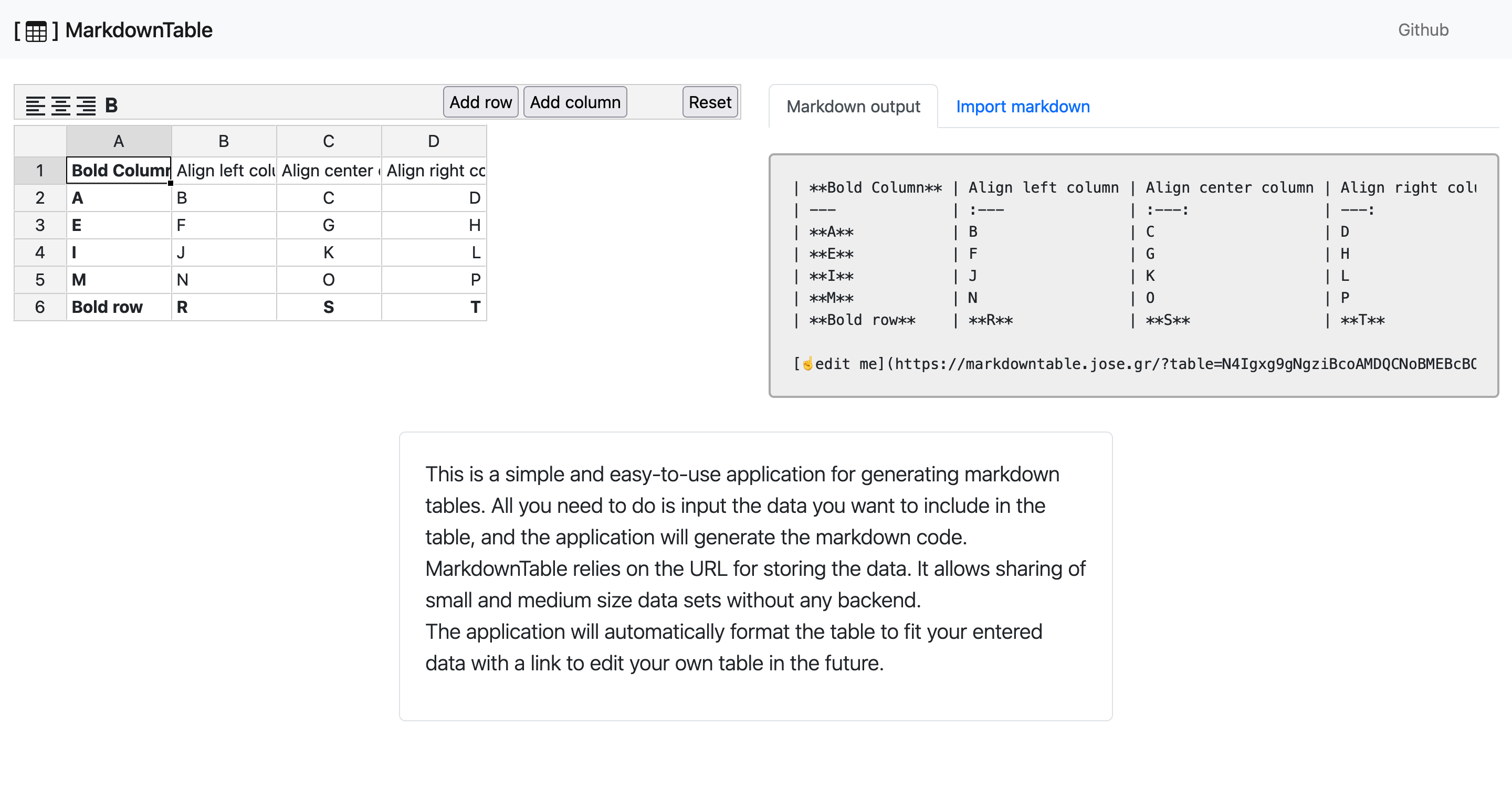
<p><img src="/assets/markdowntable.png" alt="MarkdownTable screenshot" /></p>

<p>There are many other alternatives on the internet, but <a href="https://markdowntable.jose.gr/">MarkdownTable</a> includes in
the generated <strong>Markdown code</strong> a link to edit it self.</p>

<p>The app stores the state in the URL. It allows generating a link to the own
table without storing anything on the server.</p>

<p>There is no official max length for the URL, but some maximums depend on the client and server combination. More about <a href="https://www.sistrix.com/ask-sistrix/technical-seo/site-structure/url-length-how-long-can-a-url-be">maximum URL length</a>.</p>

<p>MarkdownTable relies on <a href="https://pieroxy.net/blog/pages/lz-string/index.html">lz-string</a>
to squeeze the data. It allows more data storage and shorter links without server-side intervention.</p>

<p>The app allows copying and pasting directly from a spreadsheet or CSV, importing an existing markdown table
and create a new table from scratch.</p>

<p>The spreadsheet UI is based on <a href="https://bossanova.uk/jspreadsheet/v4/">Jspreadsheet v4</a>.</p>

<p>I did the app as an excuse to play around with Svelte. The experience was charming. Probably because the <a href="https://svelte.dev/docs">Svelte documentation</a> is excellent.</p>

<p>There are thousands of examples of the <a href="https://svelte.dev/repl/">Svelte Repl</a>. The Svelte web doesn’t list them, but you can find them <a href="https://www.google.com/search?q=site:https://svelte.dev/repl">through Google</a> (<code class="highlighter-rouge">site:https://svelte.dev/repl</code>).</p>

<p>The code is available on <a href="https://github.com/ceritium/markdowntable">Github</a> and open for issues and merge requests.</p>

<p><strong>Example:</strong></p>

<table>
  <thead>
    <tr>
      <th><strong>Bold Column</strong></th>
      <th style="text-align: left">Align left column</th>
      <th style="text-align: center">Align center column</th>
      <th style="text-align: right">Align right column</th>
    </tr>
  </thead>
  <tbody>
    <tr>
      <td><strong>A</strong></td>
      <td style="text-align: left">B</td>
      <td style="text-align: center">C</td>
      <td style="text-align: right">D</td>
    </tr>
    <tr>
      <td><strong>E</strong></td>
      <td style="text-align: left">F</td>
      <td style="text-align: center">G</td>
      <td style="text-align: right">H</td>
    </tr>
    <tr>
      <td><strong>I</strong></td>
      <td style="text-align: left">J</td>
      <td style="text-align: center">K</td>
      <td style="text-align: right">L</td>
    </tr>
    <tr>
      <td><strong>M</strong></td>
      <td style="text-align: left">N</td>
      <td style="text-align: center">O</td>
      <td style="text-align: right">P</td>
    </tr>
    <tr>
      <td><strong>Bold row</strong></td>
      <td style="text-align: left"><strong>R</strong></td>
      <td style="text-align: center"><strong>S</strong></td>
      <td style="text-align: right"><strong>T</strong></td>
    </tr>
  </tbody>
</table>

<p><a href="https://markdowntable.jose.gr/?table=N4Igxg9gNgziBcoAMDQCNoBMEBcBOArgKYC+ANCAIyogCGUAlgOYB2CIURAZjiOSACYa9Zm3jgiLHETx8KAZmGNW7PMwAWvEvzwQA7nEQgArDQxRs8fMW0UwRKLFT9MtHLQQBtTyABCWAAIAYWgCAFs2CgBBZRYAzh4AyChwyJAY0STJaTwk0IiQaNiAtSZNPJSCgF0yHyjCvwaghoAREBqfAFEGgDEGgHEGgAl22pAASQaAKQaAaQaAGVGfAFkGgDkGgHkGgAVlv0DdPQaAJQaAZQaAFXaqkiA&amp;v=0">☝️edit me</a></p>]]></content><author><name></name></author><summary type="html"><![CDATA[I made a small app to generate Markdown tables.]]></summary></entry><entry><title type="html">Choose the stack technology based on your resources</title><link href="/2021/10/24/choose-the-stack-technology-based-on-your-resources.html" rel="alternate" type="text/html" title="Choose the stack technology based on your resources" /><published>2021-10-24T17:54:31+00:00</published><updated>2021-10-24T17:54:31+00:00</updated><id>/2021/10/24/choose-the-stack-technology-based-on-your-resources</id><content type="html" xml:base="/2021/10/24/choose-the-stack-technology-based-on-your-resources.html"><![CDATA[<p>The technology that we choose will affect our productivity in many ways. It is not about how secure, flexible, or cool it would be. It is also essential to consider how specialized your team has to handle them.</p>

<p>Some technologies require high specialization; sometimes, it is not apparent until things start going wrong.</p>

<h2 id="spa-single-page-applications">SPA (Single Page Applications)</h2>

<p>Leaving aside that I consider that the SPA approach is wrong most of the time, a Ruby on Rails team that decides to implement the frontend as a SPA will require some specialization on Node and frontend frameworks ecosystem.</p>

<h2 id="deployment">Deployment</h2>

<p>A small company with one or two services would be enough to deploy using Capistrano or pay for some PaaS like Heroku instead of managing a complex Kubernetes or similar setup. In any case, I would not expect that the same group of people can develop backend, frontend and also be up to date in all the knowledge required to manage a proper Kubernetes infrastructure.</p>

<h2 id="micro-services">(Micro)-Services</h2>

<p>Before deciding to extract or implement a new feature as a service, the same company should consider the deployment and maintenance of the new service. If they are using Capistrano, it will mean a new set of servers to manage. If they use a PaaS, it will mean spending much more money.</p>

<h2 id="event-sourcing">Event Sourcing</h2>

<p>It is another trend in software development. There are valid use cases for this approach. Still, it entails high specialization for managing specific services like AMQP or Kafka, understanding the new technologies, researching the ecosystem for your base language, and sometimes introducing a new language.</p>

<h2 id="new-languages-frameworks-databases-and-so-on">New languages, frameworks, databases, and so on</h2>

<p>The introduction of microservices and platforms like Kubernetes will allow experimenting on production with more languages, frameworks, and databases. All these new technologies require expertise for a good and reliable service.</p>

<p>If you are willing to switch to something different because you have many troubles with your current stack, consider that the new one will bring new issues and drag the ones that belong to other components of your stack.</p>

<h2 id="final-thoughts">Final thoughts</h2>

<p>A high specialized stack requires specialized teams and makes sharing the knowledge and responsibilities harder.</p>]]></content><author><name></name></author><summary type="html"><![CDATA[The technology that we choose will affect our productivity in many ways. It is not about how secure, flexible, or cool it would be. It is also essential to consider how specialized your team has to handle them.]]></summary></entry><entry><title type="html">Let the Linter Do Its Job</title><link href="/posts/let-the-linter-do-its-job/" rel="alternate" type="text/html" title="Let the Linter Do Its Job" /><published>2021-09-14T16:08:59+00:00</published><updated>2021-09-14T16:08:59+00:00</updated><id>/posts/let-the-linter-do-its-job</id><content type="html" xml:base="/posts/let-the-linter-do-its-job/"><![CDATA[<p>Please, let the linter do its job. Stop doing code reviews indicating all the empty lines, white spaces, and other nitpick things.</p>

<p>I agree that a heterogeneous code simplifies the reading but recognizes that some things are personal taste. It’s not useful to apply your preferences only in a few lines if the rest of the code is not coherent.</p>

<p>So please, rely on a linter,  Rubocop is a good option for Ruby, but there are other alternatives.</p>

<p>You can discuss defining the rules as long as you want, but not on every pull request.
I prefer not to invest too much time defining the rules. In the case of Rubocop, I usually start with the default config, maybe even add some extensions, like the Rails or Performance one. Then, I can modify the rules on demand, depending on the team’s taste and the project’s requirements.</p>

<p>It’s important to define a strategy to maintain Rubocop’s warnings. I like to auto-fix all the warnings with <code class="highlighter-rouge">-a</code> and sometimes <code class="highlighter-rouge">-A</code>.  If something else is still raising warnings then I generate a <code class="highlighter-rouge">.todo_rubocop.yml</code> with <code class="highlighter-rouge">--auto-gen-config</code>. Then I can run <code class="highlighter-rouge">rubocop</code> as part of my continuous integration and mark it as a failure if it raises a warning.</p>]]></content><author><name></name></author><summary type="html"><![CDATA[Please, let the linter do its job. Stop doing code reviews indicating all the empty lines, white spaces, and other nitpick things.]]></summary></entry><entry><title type="html">Save the URL, the lightbox</title><link href="/posts/the-lightbox-save-the-url/" rel="alternate" type="text/html" title="Save the URL, the lightbox" /><published>2021-07-21T16:02:24+00:00</published><updated>2021-07-21T16:02:24+00:00</updated><id>/posts/save-the-url-the-lightbox</id><content type="html" xml:base="/posts/the-lightbox-save-the-url/"><![CDATA[<p>The lightbox or modal has become a design resource that is extremely abused, but that gives for another article, so instead of refusing to implement them, let’s take into consideration the possible options:</p>

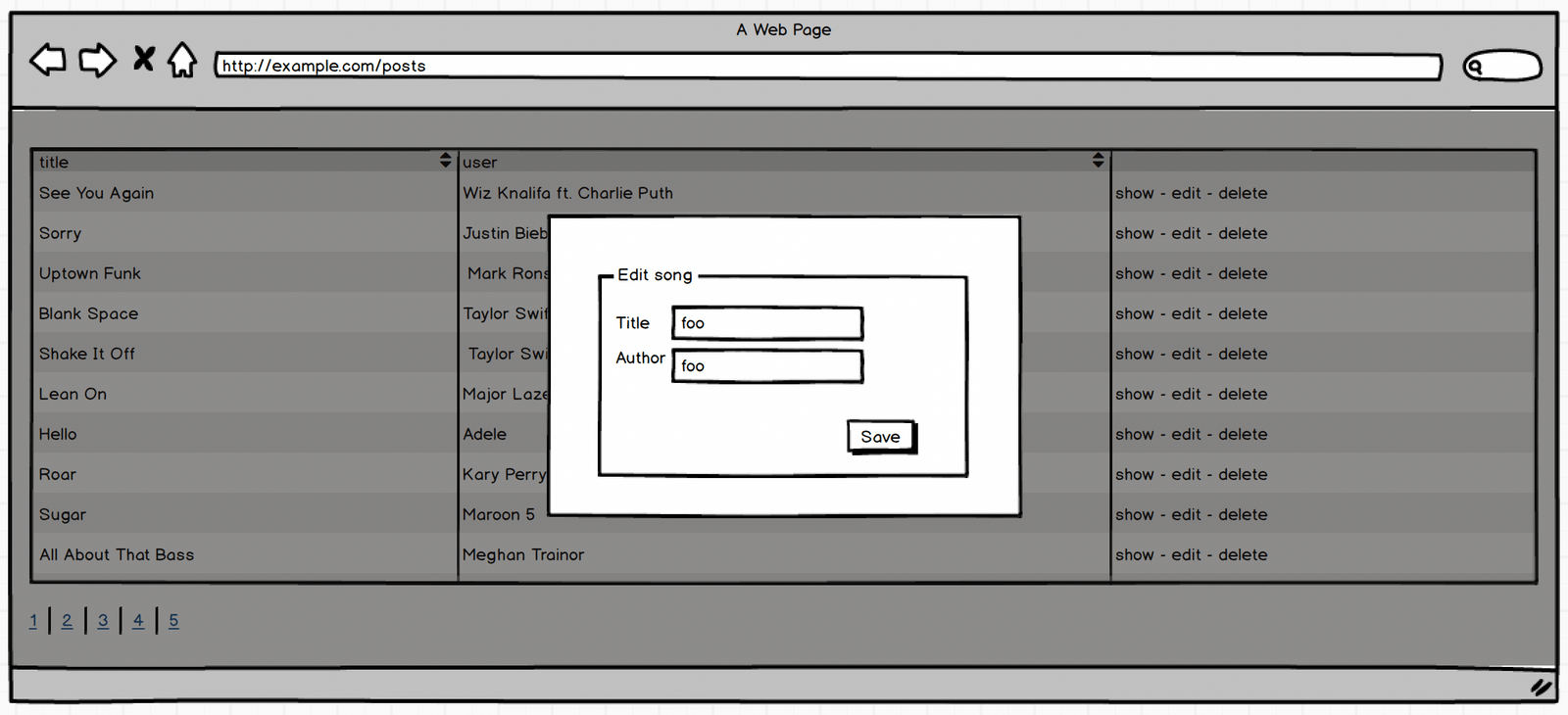
<p><img src="/assets/lightbox-example.png" alt="Lightbox example" /></p>

<p><strong>Always open the lightbox</strong></p>

<p>This is what I see most often. It prevents sharing the URL or reloading the page without losing the form.</p>

<p><strong>Open the lightbox on click and implement a specific view</strong></p>

<p>It allows open the lightbox on click, but it allows open the link in a new tab with the browser options (CMD/ctrl+click).</p>

<p>If the user opens the lightbox, will lose the information in case of reloading the page, but it allows “advanced” users to open the link on a new page.</p>

<p><strong>Keep the list state and append the item</strong></p>

<p><code class="highlighter-rouge">/posts?page=2&amp;order_by=title&amp;edit=33</code></p>

<p>This approach can make the implementation a bit complex. There is no guarantee that the row we are editing will be on the same page forever. So it would cause other interaction problems. For example, the user doesn’t see in the list the item after editing it.</p>

<p><strong>Replace the URL</strong></p>

<p><code class="highlighter-rouge">/posts/33/edit</code></p>

<p>With this approach, when the user reloads the URL, will see only the “EDIT”, the user can always go back using the browser history.</p>

<h2 id="conclusion">Conclusion</h2>

<p>There is no perfect solution as far as I know. There are other options for sure, and we can combine them. In my opinion, it is important to be aware of the problems that the lightbox presents and how to mitigate them.</p>

<p>In this case, I am talking about the lightbox, but It would apply to other UI solutions that try to avoid the navigation to new URLs.</p>

<h2 id="related">Related</h2>

<ul>
  <li><a href="https://jose.gr/posts/save-the-url-save-the-web/">Save the URL, Save the web</a></li>
  <li><a href="https://github.com/ceritium/rails-demo-list">Implementation of a paginated list</a> filterable and sortable with different approaches on rails.</li>
</ul>]]></content><author><name></name></author><summary type="html"><![CDATA[The lightbox or modal has become a design resource that is extremely abused, but that gives for another article, so instead of refusing to implement them, let’s take into consideration the possible options:]]></summary></entry><entry><title type="html">Save the URL, save the web</title><link href="/posts/save-the-url-save-the-web/" rel="alternate" type="text/html" title="Save the URL, save the web" /><published>2021-06-28T13:49:39+00:00</published><updated>2021-06-28T13:49:39+00:00</updated><id>/posts/save-the-url-save-the-web</id><content type="html" xml:base="/posts/save-the-url-save-the-web/"><![CDATA[<p>The URL has always been abused:</p>
<ul>
  <li><a href="https://portswigger.net/kb/issues/00500700_session-token-in-url">Passing session tokens</a></li>
  <li><a href="https://jkorpela.fi/forms/methods.html">Mixing GET and POST on submitting forms</a> without taking care of security, idempotency, or usability.</li>
  <li>Misconceptions about WWW (<a href="http://no-www.org/">no-www</a> and <a href="https://www.yes-www.org/">yes-www</a>).</li>
  <li>Sites based on FLASH or Java applets ignore the URL completely.</li>
</ul>

<p>AJAX replaced FLASH and Java applets bringing us reactive websites following web standards. But again, we were able to ignore or missuse the URL.</p>

<p>The same is happening with sites developed with SPA-oriented frameworks like React, Angular, Vu or backend powered technologies like StimimulusReflex, Hotwire, and Liveview… because the problem is not the technology. The problem is ignoring the URL.</p>

<p>As you can see, the problem is not inherent to SPA frameworks but can be exacerbated due to multiple reasons:</p>

<ul>
  <li>Most of these frameworks are virtual dom-based, maintaining an internal state and updating the real dom on demand. Therefore, it is easier for the developer to ignore other sources of information like the URL.</li>
  <li>At least with React, “Hot reloading” allows us to update the page we are developing without losing the internal state, so you don’t feel the need to reflect the state in the URL.</li>
  <li>Some frontend developers with up to 10 years of experience have only worked with those frameworks, so they consider it normal behavior.</li>
  <li>There is a trend to design websites as web apps. Unfortunately, with that, we lose some of the features and advantages of the web.</li>
</ul>

<p>I think it is worth remembering, however obvious, the benefits of respecting and treating URLs with affection may be.</p>

<h2 id="benefits">Benefits</h2>

<p>The URL not only allows us to find a resource (website in this case). It also lets us define the initial state, so a user will be able to:</p>

<ul>
  <li>Save the URL for later.</li>
  <li>Open multiple instances of the same page in the same or different state.</li>
  <li>Share a page in a specific state (like a list with some filters applied).</li>
  <li>We can link from a page with a specific state from different apps. It allows collaboration between websites.</li>
</ul>

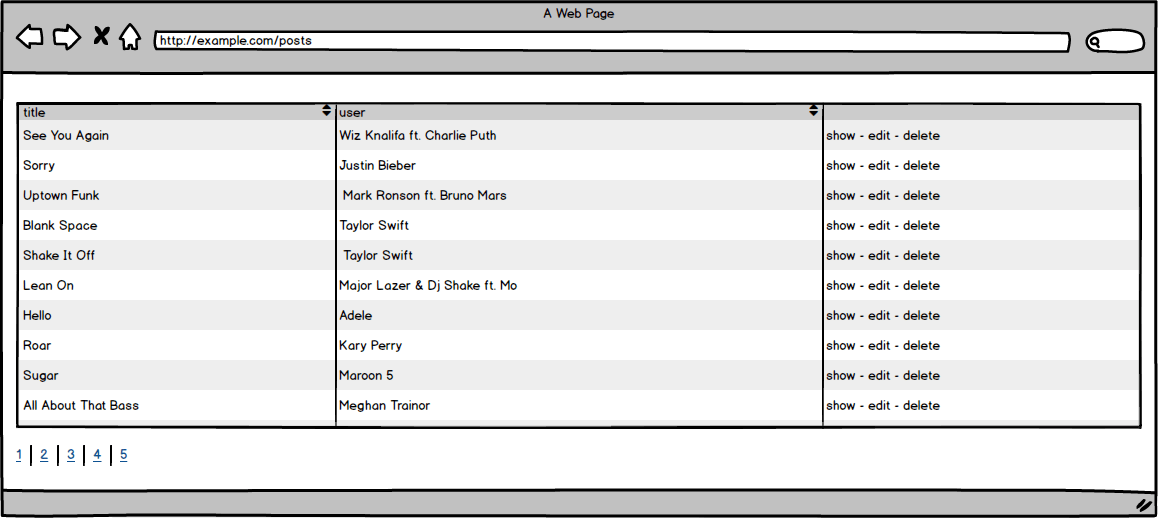
<p>What do I mean when I say “status”?  Imagine a paginated list of items that can be filtered and sorted like the next one:</p>

<p><img src="/assets/list-example.png" alt="List example" /></p>

<p>The status would be which page and element we are sorting, for example, using query params. We could also include filters (<code class="highlighter-rouge">/posts?page=2&amp;order_by=title</code>).</p>

<h2 id="what-should-we-reflect-in-the-url">What should we reflect in the URL?</h2>

<p>To know if we need to reflect something in the URL, we can ask ourselves if a user, when reloading, saving, or sharing a web, would want to keep its status.</p>

<p>If you think it would be useful but very difficult or impossible, maybe we should check if the design is suitable for the web.</p>

<p>Some examples:</p>

<p><strong>Probably necessary</strong></p>

<ul>
  <li>Pagination</li>
  <li>Sort of a list</li>
  <li>Element of a list that we are viewing</li>
  <li>Search filters</li>
  <li>Date time filters</li>
</ul>

<p><strong>Probably unnecessary</strong></p>

<ul>
  <li>Dropdown state</li>
  <li>Menu state, like hovering</li>
  <li>Scroll</li>
</ul>

<h2 id="good-examples">Good examples</h2>

<ul>
  <li><a href="https://github.com/search?l=Markdown&amp;p=2&amp;q=URL&amp;type=Code">Github search</a>: the URL includes the query terms, pagination, and filters.</li>
  <li>Github code links: It allows us to link the <a href="https://github.com/rails/rails/blob/main/activerecord/lib/active_record/core.rb#L294-L338">highlighted</a> parts of the code.</li>
  <li>Google search: similar to GitHub search, but the result can differ depending on other variables not part of the URL, like user preferences, geolocation, black magic, etc.</li>
  <li>Google Maps: It reflects in the URL zoom, position, kind of view, details of a picture, and details of a place. It updates the URL by clicking on an element or just navigating on the map.</li>
</ul>

<h2 id="related">Related</h2>

<ul>
  <li><a href="https://github.com/ceritium/rails-demo-list">Implementation of a paginated list, filterable and sortable with different approaches on Rails</a>.</li>
  <li><a href="https://galisteoruiz.com/the-lightbox-save-the-url/">Save the URL, The lightbox</a></li>
</ul>]]></content><author><name></name></author><summary type="html"><![CDATA[The URL has always been abused: Passing session tokens Mixing GET and POST on submitting forms without taking care of security, idempotency, or usability. Misconceptions about WWW (no-www and yes-www). Sites based on FLASH or Java applets ignore the URL completely.]]></summary></entry></feed>